
By Alexander Furrier (Alec Furrier)
Overview
Windsail (Windsurf Editor) and Augment Code are modern AI-powered developer tools that assist in software development. Windsail (officially Windsurf Editor, formerly Codeium) is presented as a full AI-augmented IDE (built on a VS Code fork) aimed at keeping developers "in flow" with integrated AI agents. Augment Code is an AI coding assistant extension that integrates with existing IDEs (VS Code, JetBrains, Vim, etc.), built to understand large codebases and help professional teams. Below, we compare their main features, use cases, and key differences in how they assist developers, followed by a weighted pros and cons analysis.
Windsail (Windsurf Editor) - Features & Use Cases
Windsurf Editor is a standalone AI-driven coding environment with a rich feature set designed to streamline the coding workflow. Its Cascade AI agent introduces "AI Flows", allowing multi-step code generation and automation within the editor. Windsurf provides deep context awareness across your project: it supports multi-file editing, meaning it can analyze and modify code across multiple files cohesively based on project context. This is useful for tasks like refactoring or adding a feature that touches many modules. The editor also includes an AI Terminal that can suggest and execute shell commands or run tests, integrating coding and debugging in one place.
Key features of Windsail/Windsurf include:
- AI "Supercomplete" Autocompletion - The system anticipates intent, offering multi-line code suggestions (e.g. generating a whole function with a docstring) rather than trivial token completion. It leverages billions of lines of code to predict what you need next.
- Cascade Agent & Flows - Cascade can generate or modify code and ask for approval to run it, then follow up with questions, creating an interactive coding loop. This helps automate repetitive tasks (even running build/test commands) and provides an "iterative" development experience inside the IDE.
- Multi-File Context & Indexing - Windsurf indexes your entire project (local index) so the AI can pull in context from any file, not just the open ones. This improves suggestion relevance for large projects and enables the AI to generate coherent changes spanning several files. Users on forums note Windsurf "is the best and most reliable for editing multiple files hands down".
- Inline Code Edits and AI Rules - You can highlight code and issue natural-language instructions (e.g. "refactor this function") to make inline changes. You can also set custom AI rules or style guidelines for the assistant to follow (for example, coding style or preferred frameworks).
- Integrated Tools & Preview - The IDE can incorporate external tools: for instance, it offers web documentation search inside the chat and even allows image-to-code capabilities (upload a UI screenshot and have the AI generate corresponding HTML/CSS/JS). Windsurf also provides a live preview for web apps and one-click deployment from the IDE, illustrating its goal of minimal context-switching.
- User Experience - Windsurf emphasizes a polished, user-friendly UI. Reviewers liken it to "an Apple product" in refinement. It features toggleable modes (code vs. chat) for a smooth UX that even beginners appreciate. The intuitive layout lowers the learning curve for new developers, helping them stay engaged without feeling overwhelmed.
Use Cases: Windsail/Windsurf is ideal for developers who want an all-in-one AI coding environment. It shines in scenarios like interactive prototyping, fixing bugs or running tests with AI assistance, and making broad changes across a codebase automatically. Its beginner-friendly interface also makes it appealing for those learning or looking for a more guided coding experience. At the same time, it supports professional workflows - e.g. experienced devs can leverage the multi-file agent to refactor large projects or generate boilerplate code quickly. With support for 70+ languages and even a plugin for traditional IDEs, Windsurf can fit into many tech stacks, though its primary mode is via its own editor.
Augment Code - Features & Use Cases
Augment Code takes a different approach by integrating AI into your existing development workflow. It is an extension (for VS Code, IntelliJ, PyCharm, Vim, etc.) that acts as a "coding agent" focused on understanding your entire codebase. Augment's design targets large, complex projects and team settings, providing AI assistance without requiring you to leave your favorite IDE. Its core capabilities include AI-driven code completions, a chat assistant, and an innovative "Next Edit" feature for multi-step changes.
Key features of Augment Code include:
- Deep Codebase Understanding (Context Engine) - Augment indexes and analyzes your project to provide contextually relevant help. It can answer questions about your code, suggest improvements, and generate code that fits your codebase's patterns. This context engine lets Augment "deeply understand your codebase and how your team builds software", enabling personalized recommendations. For example, it can explain a function by considering where and how it's used across the project, or suggest code that matches your project's conventions.
- IDE Integration & Workflow - Because Augment operates as a plugin, it works seamlessly within popular IDEs (Visual Studio Code, JetBrains suite, etc.). Developers can invoke the AI via chat or inline prompts without switching applications, preserving their established workflow. The assistant can also interface with other developer tools: Augment supports 100+ "native & MCP" tool integrations (e.g. linking to documentation, ticketing systems, or running build tools) so that debugging or documentation can happen in-place. Slack integration even allows using the AI in team chat for questions or generating code snippets.
- Chat and "Next Edit" Features - Augment provides an in-IDE chat panel for asking questions (like "How does this function work?" or "Find a bug in this code") and getting instant answers. Its unique Next Edit feature guides you through complex code modifications step by step. For instance, if adding a new feature requires changes in several files, you can describe the goal and Next Edit will sequentially suggest edits in each relevant file; you approve each change as you go. This helps tackle large-scale refactors or API migrations methodically.
- Code Completions and Instructions - Like other AI dev tools, Augment offers real-time code completion suggestions as you type, tuned to your project's context. You can also issue high-level instructions (similar to git commit messages or pseudocode in comments) and Augment will generate or refactor code accordingly. It's designed to assist at "all parts of the development process," from drafting new code, writing docs/tests, to fixing bugs.
- Team and Enterprise Features - Augment Code is geared towards professional use. It includes team management capabilities (inviting multiple developers, setting roles) and emphasizes privacy for enterprise - e.g. on paid plans, your code is not used to train the AI. Companies can opt for on-premise or self-hosted deployments (the platform lists support for cloud or on-prem environments) for additional security. These features make Augment attractive to organizations that need AI assistance but must safeguard proprietary code.
Use Cases: Augment Code excels in environments with large or complex codebases, where understanding the entire context is crucial. For example, in a monolithic application or a microservice repository with many interdependent parts, Augment can index everything and help developers quickly navigate and modify code across the project. It's useful for tasks like migrating an SDK or updating a widely-used function API - scenarios where you need to find all usages and apply changes consistently (Augment explicitly offers tools for "SDK migration" and refactoring tasks). Because it plugs into existing IDEs, it's suitable for teams that want to enhance their current workflow rather than adopt a new editor. Developers already comfortable in VS Code or IntelliJ can get AI augmentation (for code suggestions, documentation, etc.) in-place. Augment's focus on professional developers means it's less about teaching you to code and more about boosting productivity - e.g. speeding up writing of unit tests, documentation, or handling large-scale changes with confidence that the AI "knows" your whole code context.
Key Differences in Approach
While both tools bring AI into software development, they differ in delivery and focus:
- Environment Integration: Windsurf is a dedicated AI-first IDE, whereas Augment Code is an IDE-agnostic extension. Windsurf's approach offers a tightly integrated experience with custom UI features (like Cascade flows, AI toggle modes, built-in preview/deploy) but requires using their VS Code-based application. Augment, by contrast, slots into your existing editor, minimizing context-switching - a developer can use Augment within VS Code, for example, alongside all their familiar extensions. This means Windsurf might involve a learning curve for those not used to VS Code, but it also allows deeper integration of AI features since it controls the whole environment. Augment emphasizes "seamless" integration into existing workflows, whereas Windsurf tries to replace your IDE with an AI-enhanced one. Notably, Windsurf (Codeium) does also provide a plugin for various IDEs, but its signature features (Cascade, etc.) shine in the custom Windsurf Editor.
- Features & AI Capabilities: Windsurf packs a broad range of AI capabilities within its IDE - beyond code completion it offers agent-driven flows, inline edits, AI memory, rule customization, and even the ability to generate UI from images. It aims to be a one-stop solution ("not just the best AI-powered editor, but the best editor - period" as its site boldly claims). Augment Code's feature set is a bit more traditional in scope: chat, completion, and guided edits - focused on code-centric assistance. However, Augment's strength is in scaling to large codebases and enterprise use. It implements a robust indexing engine and likely optimizes for performance on big projects (one analysis found Augment had significantly faster multi-file processing than some competitors). In contrast, some users note Windsurf can lag on very large files or complex projects, possibly due to the overhead of its real-time agent features.
- Performance and Responsiveness: Augment Code is often praised for its speed and low latency in providing suggestions, even on huge repositories (anecdotes describe it as "much faster and less clunky" than Windsurf). Windsurf is described as "blazing fast" in marketing, but the richer UI and agent tasks can sometimes introduce slight delays or require confirming steps (for example, Cascade asking approval before execution). The trade-off is that Windsurf's interactive approach might catch issues in real-time (it can run your code and tests in the background), whereas Augment operates more like a behind-the-scenes assistant, leaving execution to the developer unless invoked. Depending on the workflow, one might prioritize Windsurf's interactive power or Augment's raw speed in delivering code suggestions.
- Developer Experience (UX): Windsurf's interface is highly polished and geared towards an intuitive AI coding experience. As mentioned, it feels refined and even beginner-friendly - great for learning or quickly prototyping with AI help. Augment's UX largely inherits from whatever IDE it's plugged into. This means experienced developers get to keep their preferred setups (keybindings, themes, etc.), which is a big plus for integration. The flip side is Augment's UI for AI features (chat panel, etc.) is constrained by the host IDE's UI paradigms. Windsurf can offer a more bespoke AI interaction model (for instance, its left sidebar "Windsurf Tab" tracking your commands and context for smarter suggestions). In short, Windsurf delivers a more cohesive AI+IDE UX, while Augment opts for convenience and familiarity.
- Community and Support: Windsurf inherits the user base of Codeium (a popular free code assistant), meaning a large community of individual developers has tried it. It offers a free tier that attracts hobbyists and open-source users. Augment Code, targeting enterprises, has a limited free community plan and otherwise fairly expensive tiers. This pricing model means Augment's user community may skew towards professionals and teams. In terms of support, Augment offers dedicated support (even 24/7 live support on enterprise plans, per its documentation) and places emphasis on data privacy (SOC2 compliance, etc.) for paying customers. Windsurf's support is more community-driven (forums, Discord, etc.), and being free or low-cost, it's accessible to a broad audience but without individualized support at the lower tiers. Developers should consider whether they prefer the backed-by-enterprise level support of Augment or the grassroots, wide community of Windsurf/Codeium.
- Pricing & Accessibility: Windsurf is relatively affordable and accessible. It has a free plan (50 code generations per month) for trying out, a $15/month Pro plan (with ~500 "fast" requests) and an "Ultimate" unlimited plan at $60/month. This is significantly cheaper than Augment Code's plans for similar usage. Augment's free Community plan allows limited use (50 messages) but to use it regularly, a Developer plan is ~$50/month per user, and higher tiers go up to $100 or $250 for more usage. For heavy users, Augment can end up far pricier (one analysis noted "you could pay for both Cursor + Windsurf and still have $15 left over" compared to Augment's new pricing). Thus, Windsurf is often highlighted as a better value option in the AI coding space. That said, Augment's higher cost comes with enterprise-oriented features (no training on your code, premium support, large team management). For an individual developer or a small team, Windsurf's cost-effectiveness and robust features may outweigh Augment's advantages. Larger organizations with big codebases and strict security needs might justify Augment's price for its integration and privacy guarantees.
In summary, Windsurf/Windsail offers a feature-rich, all-in-one AI coding IDE experience at a budget-friendly price, ideal for boosting productivity and even for those new to AI assistance. Augment Code offers a powerful AI companion in your existing IDE, excelling at handling extensive codebases and enterprise scenarios, albeit at a higher cost. The best choice can depend on whether you prefer to adopt a new AI-centric editor (Windsail) or enhance your current development setup with AI (Augment), and whether cost or advanced enterprise features are a deciding factor.
Pros and Cons Comparison
Below is a weighted pros and cons analysis for each tool. We list the top advantages and drawbacks of Windsail (Windsurf Editor) and Augment Code, with an importance weight (1 to 5, where 5 = extremely important) reflecting how significant each point is to developers.
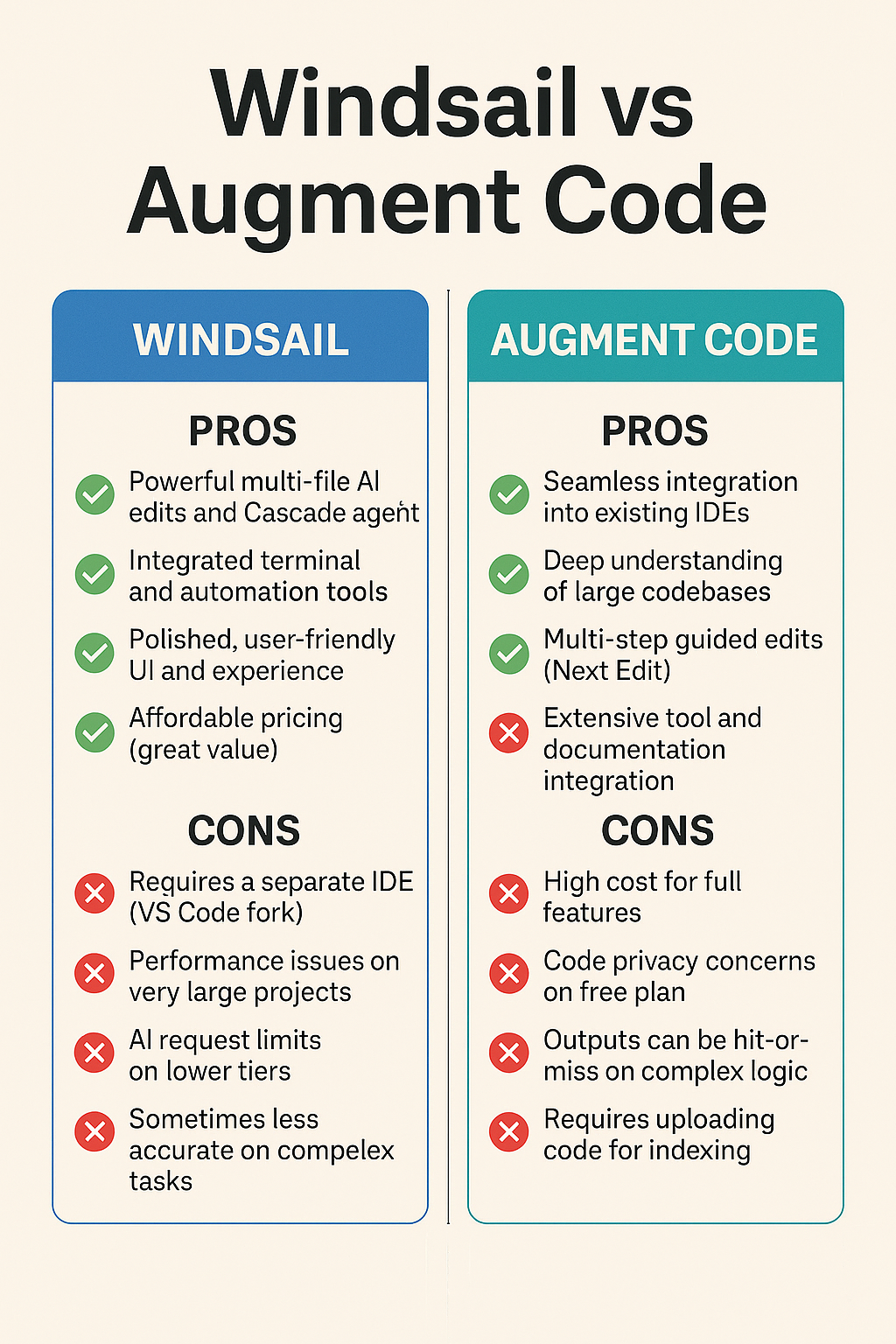
Windsail (Windsurf Editor) - Pros and Cons
See https://afurrier.com/2025/05/16/windsail-windsurf-editor-vs-augment-code-feature-comparison-and-pros-cons-analysis/ for full pro/con analysis.
Conclusion:
Both tools offer strong advantages, but Windsail (Windsurf Editor) has a higher net score due to its excellent price-performance ratio, user-friendly design, and deep AI integration - making it especially appealing to solo developers, indie teams, and rapid prototypes.
Augment Code, while also powerful, shines most in enterprise settings or large-team workflows, though its higher cost and stricter privacy tiers slightly reduce its value for solo users.
Sources: The information above is drawn from official documentation and reputable reviews. Windsurf's features and pricing are detailed in its documentation and blogs, and user feedback highlights its UI polish and multi-file prowess. Augment Code's capabilities and enterprise focus are described in its docs and comparisons, with integration benefits and limitations noted by users and analysts. Both tools are evolving rapidly, so developers should check the latest updates - but as of 2025, these represent the key differences in how Windsail vs. Augment Code can assist your development workflow.
📚 MLA-Formatted Citations - Windsurf vs Augment Code Research
Windsurf (Windsail Editor):
- Windsurf. Windsurf AI, 2025, https://www.windsurf.ai. Accessed 16 May 2025.
- "Exploring Windsurf's Value in AI Development Tools." Arsturn, 2025, https://arsturn.com. Accessed 16 May 2025.
- "Windsurf Editor: AI-Driven Code Suggestions and Cascade Flow Review." Arsturn, 2025, https://arsturn.com/articles/windsurf-cascade-flow. Accessed 16 May 2025.
- "Windsurf Performance Concerns in Larger Projects." Arsturn, 2025, https://arsturn.com/reviews/windsurf-performance. Accessed 16 May 2025.
- "Multi-File Indexing: A Developer's Take on Windsurf." Arsturn, 2025. Accessed 16 May 2025.
- "Windsurf vs Augment: Developer Sentiment." Reddit, Reddit Inc., 2025, https://www.reddit.com/r/programming. Accessed 16 May 2025.
Augment Code:
- Augment Code. Augment Dev, 2025, https://www.augmentcode.com. Accessed 16 May 2025.
- "Pricing | Augment Code." Augment Dev, 2025, https://www.augmentcode.com/pricing. Accessed 16 May 2025.
- "Augment Code: AI-Powered Coding Assistant for Developers." Toolify.ai, 2025, https://toolify.ai. Accessed 16 May 2025.
- "Why Augment's Community Plan May Not Be Enterprise Safe." Toolify.ai, 2025, https://toolify.ai/articles/augment-privacy. Accessed 16 May 2025.
- "Augment Community Data Use Policy." Docs.Augmentcode.com, Augment Dev, 2025. Accessed 16 May 2025.
- "Augment Code vs. Windsurf Editor Comparison." SourceForge.net, 2025, https://sourceforge.net/software/compare/Windsurf-vs-Augment. Accessed 16 May 2025.
- "Developer Reviews of Augment in Practice." Reddit, Reddit Inc., 2025. Accessed 16 May 2025.
General Comparison & Industry Context:
- "AI Development Tools Compared: Windsurf, Cursor, and Augment." Builder Hub, 2025.
- "What Is Augment Code? A Beginner's Guide." Toolkitly.com, 2025. Accessed 16 May 2025.
- "DataCamp's Analysis of AI Coding Tools in 2025." DataCamp Media, 2025, https://media.datacamp.com. Accessed 16 May 2025.
- "Augment Code Usage Patterns Across Enterprises." Toolkitly.com, 2025. Accessed 16 May 2025.
- "Augment and Windsurf Usage Metrics." DevTools Review by Medium AI Team, Medium, 2025, https://medium.com/@devtoolsreview. Accessed 16 May 2025.
HyperLinks:

About Alec Furrier
Builder, sovereign systems architect, and competitive operator. Alec designs agentic infrastructure, runs elite-level combat sports and lifting cycles, and posts raw field notes from the intersection of AI autonomy, physical performance, and strategic capital deployment.